The objective of this SQL Server tutorial is to teach you how use an INNER JOIN to return matching rows from two or more tables.
What is INNER JOIN in SQL Server?
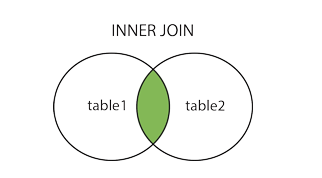
An INNER JOIN is one of the 5 types of JOINS available in SQL to fetch and combine columns from different related tables. An INNER JOIN is a JOIN between two tables where the JOIN resultset consists of rows from the left and right table which match the JOIN condition. The JOIN condition is specified on a common column (i.e. columns holding the same data even though the column names might be different in the participating tables). Rows in the tables which do not match the JOIN condition (i.e. where the JOIN condition is not satisfied) are not included in the resultset. It can be pictorially represented as below.
Operation
An INNER JOIN can be used in all the query types i.e. SELECT, INSERT, UPDATE and DELETE. It is the most popular and commonly used JOIN of all the JOIN types. A SQL query can contain multiple INNER JOINS and an INNER JOIN can be combined with other types of JOINS like say LEFT JOIN etc.
SQL Server INNER JOIN Syntax
The basic syntax of SQL Server INNER JOIN clause is as follows.
SELECT column_list
FROM table1
INNER JOIN
table2
ON table1.columnX=table2.columnX;
In this syntax,
column_list – the list of columns from the participating tables in the SELECT statement.
table1 – the first or left table.
table2 – the second or right table.
INNER JOIN/JOIN – SQL keyword combination to implement an INNER JOIN (where the resultset is the intersecting rows of the participating tables).
columnX – column common to both tables on which the JOIN is made.
SQL Server INNER JOIN Examples
Let us see how an INNER JOIN works with the help of practical examples.
Suppose we have 3 tables – a customer_details table containing customer information, an order_details table containing information of orders placed by those customers and an employee table containing the information of employees who handle the customer orders. The tables are represented below. We will use them as the reference for our examples.
staff_id
staff_name
staff_contact
310
Tony Sebastian
16107575525
311
Nick Jagger
16633775159
staff_details Table (Containing staff data)
customer_id
customer_name
customer_city
customer_contact
210
David Brunt
New York
16529929936
211
Francis Pilot
Houston
16767335231
212
Cecilia Rhodes
Houston
16101110778
customer_details Table (Containing customer data)
order_id
customer_id
order_handler
order_date
1010
210
311
6/6/2019
1011
211
310
6/26/2019
1012
211
310
6/30/2019
1013
212
310
7/1/2019
1014
210
311
7/11/2019
1015
212
310
7/14/2019
1016
210
311
7/31/2019
1017
212
310
8/15/2019
order_details Table (Containing orders data)
1) SQL Server INNER JOIN – two table single JOIN example
We will now see how an INNER JOIN helps us in mining data from the tables and generates desired resultset. Suppose we want to find out the combination of customers and their order numbers. We can do so with the following query using INNER JOIN which joins the order_details and customer_details tables on the customer_id column common to both tables. od and cd are table aliases for the order_details and customer_details tables.
SELECT od.order_id, od.order_date, cd.customer_name
FROM order_details od
INNER JOIN customer_details cd
ON od.customer_id = cd.customer_id;
The above query will generate the following output listing the customers against their orders so that we can see the breakup of orders per customer.
order_id
order_date
customer_name
1010
6/6/2019
David Brunt
1014
7/11/2019
David Brunt
1016
7/31/2019
David Brunt
1011
6/26/2019
Francis Pilot
1012
6/30/2019
Francis Pilot
1013
7/1/2019
Cecilia Rhodes
1015
7/14/2019
Cecilia Rhodes
1017
8/15/2019
Cecilia Rhodes
2) SQL Server INNER JOIN – three table multiple JOIN example
Now suppose we want find out the staff responsible for handling the orders placed by the different customers. The same cannot be achieved by combining only the order_details and customer_details table because the customer_details table does not have any overlap with the staff_details table. In this case we have to go for two JOINS – one JOIN joins the order_details and customer_details table and another JOIN joins the order_details and staff_details table. The following query does the same. sd is table alias for staff_details table and order_handler is the column analogous to staff_id between which the second JOIN is made.
SELECT od.order_id,
cd.customer_name,
sd.staff_name
FROM order_details od
INNER JOIN customer_details cd
ON od.customer_id = cd.customer_id
INNER JOIN staff_details sd
ON od.order_handler = sd.staff_id;
The above query will generate the following output listing the orders of customers against the staff who handled the order.