The objective of this SQL Server tutorial is to teach you how to use CROSS JOIN to combine rows from two or more unrelated tables.
What is CROSS JOIN in SQL Server?
CROSS JOIN is used to combine the rows of two or more unrelated tables such that operation produces a resultset which is the Cartesian Product of the participating tables. Since the tables are unrelated, we do not have a to specify any column on which to JOIN the tables. CROSS JOINS are used to generate an exhaustive combination of datasets using data from the participating tables.
What is a CARTESIAN PRODUCT?
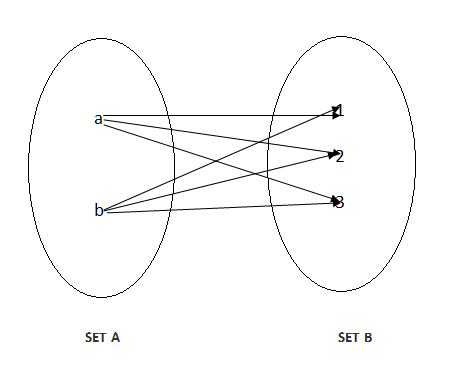
A CARTESIAN PRODUCT is a set operation which combines every element of a set with every other element of the other set. Suppose we have a SET A with x elements and another set B with y elements the result of the CARTESIAN PRODUCT will have x*y elements. To be more explicit, if set A has 2 elements a and b and set B has 3 elements 1, 2 and 3 then the CARTESIAN PRODUCT of A and B will be a1, a2, a3, b1, b2, b3.
It can be represented as a Venn Diagram like below.
Operation
A CROSS JOIN is implemented using the CROSS JOIN SQL clause in a SELECT statement and can be used to combine the datasets of two or more tables.
SQL Server CROSS JOIN Syntax
The basic syntax of CROSS JOIN is given below.
SELECT column_list
FROM table1
CROSS JOIN
table2
In this syntax,
column_list – the list of columns to be used from the participating tables by the SELECT statement.
table1 – the first or left table.
table2 – the second or right table.
CROSS JOIN – SQL keyword combination to implement a CROSS JOIN (where the resultset is a CARTESIAN PRODUCT of the participating tables).
SQL Server CROSS JOIN Examples
Let us see how we can use CROSS JOIN practically with an example. Suppose we have 3 tables in the database – a breakfast table containing breakfast item descriptions, a beverage table containing the list of beverages available and an additional table for additional or add-on items to complete a breakfast menu. The tables are represented below.
item_no
item_name
1
French Toast
2
Bread Butter
3
Pasta
Table: breakfast
item_no
item_name
1
French Toast
2
Bread Butter
3
Pasta
Table: beverage
item_no
item_name
1
Scrambled Eggs
2
Sausages
Table: additional
1) SQL Server CROSS JOIN – two table example
We will do a CROSS JOIN on the first two tables (breakfast and beverage) with the following SQL query. We have aliased the breakfast table as b1 and beverage table as b2 and sorted the output by the first column (i.e. b1.item_name) of the resultset using the ORDER BY clause.
SELECT
b1.item_name, b2.item_name
FROM breakfast b1
CROSS JOIN
beverage b2
ORDER BY 1;
It will produce the following output. We can see that Bread Butter has been combined with Tea, Coffee and Juice -Choice of Fruit (i.e. with every row of the other table). Likewise, for French Toast and Pasta and we have a total of 3*3=9 which is the cartesian product of the number of rows or records in the two tables.
item_name
item_name
Bread Butter
Tea
Bread Butter
Coffee
Bread Butter
Juice – Choice of Fruit
French Toast
Tea
French Toast
Coffee
French Toast
Juice – Choice of Fruit
Pasta
Tea
Pasta
Coffee
Pasta
Juice – Choice of Fruit
2) SQL Server CASE – three table example
Now let us try and CROSS JOIN all the 3 tables with the following query. We have aliased the breakfast table as b1, the beverage table as b2 and the additional table as a and sorted the output by the first column (i.e. b1.item_name) and second column (i.e. b.item_name) of the resultset using the ORDER BY clause.
SELECT
b1.item_name, b2.item_name, a.item_name
FROM breakfast b1
CROSS JOIN beverage b2
CROSS JOIN additional a
ORDER BY 1, 2;
It will produce the following output. We can see that Bread Butter has been combined with Coffee and the combination has been combined with Scrambled Eggs and Sausages to produce 2 rows. Likewise, for the combination of Bread Butter and Juice and Bread Butter and Tea producing 2+2+2=6 rows and 6+6+6=18 rows taking into account all the 3 items (Bread Butter, French Toast and Pasta) of the first (breakfast) table. The same is equivalent to the cartesian product of the number of rows in the 3 tables i.e. 3*3*2=18.
item_name
item_name
item_name
Bread Butter
Coffee
Scrambled Eggs
Bread Butter
Coffee
Sausages
Bread Butter
Juice – Choice of Fruit
Sausages
Bread Butter
Juice – Choice of Fruit
Scrambled Eggs
Bread Butter
Tea
Scrambled Eggs
Bread Butter
Tea
Sausages
French Toast
Coffee
Sausages
French Toast
Coffee
Scrambled Eggs
French Toast
Juice – Choice of Fruit
Scrambled Eggs
French Toast
Juice – Choice of Fruit
Sausages
French Toast
Tea
Sausages
French Toast
Tea
Scrambled Eggs
Pasta
Coffee
Scrambled Eggs
Pasta
Coffee
Sausages
Pasta
Juice – Choice of Fruit
Sausages
Pasta
Juice – Choice of Fruit
Scrambled Eggs
Pasta
Tea
Scrambled Eggs
Pasta
Tea
Sausages
Thus, we can see how CROSS JOIN generates an exhaustive list of options combining the datasets of all the participating tables. This can be useful in stock taking at month-end, year-end or to generate a list of business options by a business application for planning and decision making.