The objective of this SQL Server tutorial is to teach you how use a LEFT JOIN to return all rows from the left table and only matching rows from the right table.
What is LEFT JOIN in SQL Server?
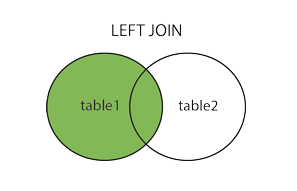
A LEFT JOIN is one of the 5 types of JOINS available in SQL to fetch and combine columns from different related tables. In a LEFT JOIN between two tables the JOIN resultset consists of all left table rows (irrespective of whether they match or do not match any row in the right table) but only matching right table rows as matched by specified JOIN condition. The JOIN condition is specified on a common column (i.e. column holding the same data even though the column names might be different in the participating tables). Rows in the right table which do not match the left table on the JOIN condition show NULL values in their columns. A LEFT JOIN can be pictorially represented as below.
Operation
A LEFT JOIN can be used in all the query types i.e. SELECT, INSERT, UPDATE and DELETE. A SQL query can contain multiple LEFT JOINS and a LEFT JOIN can be combined with other types of JOINS like say INNER JOIN etc.
SQL Server LEFT JOIN Syntax
The basic syntax of SQL Server LEFT JOIN clause is as follows.
SELECT column_list
FROM table1
LEFT JOIN table2
ON table1.columnX = table2.columnX;
In this syntax,
column_list – the list of columns from the participating tables in the SELECT statement.
table1 – the first or left table.
table2 – the second or right table.
LEFT OUTER JOIN/LEFT JOIN – SQL keyword combination to implement a LEFT JOIN (where the resultset contains complete data of the left table but only matching data of the right table).
columnX – column common to both tables on which the JOIN is made.
SQL Server LEFT JOIN Examples
Let us see how a LEFT JOIN works with the help of practical examples.
Suppose we have a mobile store and the store database has 3 tables – a customer_details table containing customer information, an order_details table containing information of orders placed by the customers and a product_details table containing the information of the different mobile handsets sold. The tables are represented below. We will use them as the reference for our examples.
product_id
product_name
310
Samsung Galaxy Note 10 Plus
311
Apple iPhone 11 Pro
312
OnePlus 7T Pro
product_details Table (Containing product data)
customer_id
customer_name
customer_city
customer_contact
210
David Brunt
New York
16529929936
211
Francis Pilot
Houston
16767335231
212
Cecilia Rhodes
Houston
16101110778
1211
Frankie
Noel
16553120210
1212
Nigel
Knight
16117715919
customer_details Table (Containing customer data)
order_id
order_date
customer_id
product_id
2011
6/6/2019
213
310
1011
6/26/2019
211
310
1012
6/30/2019
211
312
1013
7/1/2019
212
312
order_details Table (Containing orders data)
1) SQL Server LEFT JOIN – two table single JOIN example
Now suppose we want to find out whether a customer has made a purchase recently. To find the same we can implement a left join between the customer_details and order_details table on the customer_id column. It will fetch all customer records from the customer_details table (i.e. left table) and their corresponding orders. If there are no orders for a customer corresponding rows from the order_details table will be blank i.e. NULL. The following query does the same. cd and od are aliases for customer_details and order_details table.
SELECT cd.customer_name, od.order_id
FROM customer_details cd
LEFT JOIN order_details od
ON cd.customer_id = od.customer_id
ORDER BY cd.customer_name;
The query will generate the following output listing the customers against their orders. We can see that there are no corresponding orders for David Brunt, Frankie Noel and Nigel Knight.
customer_name
order_id
Cecilia Rhodes
1013
David Brunt
NULL
Francis Pilot
1011
Francis Pilot
1012
Frankie Noel
NULL
Nigel Knight
NULL
We might also want to find out whether a product is getting sold or not. To find the same we can issue a similar query to implement a left join between the product_details and order_details table on the product_id column. It will fetch all product records from the product_details table (i.e. left table) and their corresponding orders. If there are no orders for a product the corresponding rows from order_details table will be blank i.e. NULL. The following query does the same. pd and od are aliases for product_details and order_details table.
SELECT pd.product_name, od.order_id
FROM product_details pd
LEFT JOIN order_details od
ON pd.product_id = od.product_id
ORDER BY pd.product_name;
The query will generate the following output. From the output we can see that there have been no orders for OnePlus 7T Pro.