Learning Objective
The objective of this SQL Server tutorial is to teach you how to use SQL Server CREATE SCHEMA to create a new schema in the current instance of SQL Server.
This is the next of creating a database in SQL Server.
What is a schema in SQL Server
A schema in SQL Server defined as a logical collection of database objects like tables, views, store procedures, functions, indexes, triggers, etc. A user is associated with the schema known as schema owner who owns the logically related database objects.
A schema always belongs to a single database but a database can have multiple schemas in it. For example, a University database can have two schemas named
Northcampus and
Southcampus and they can have their own sets of objects like tables, views, store procedures, functions, indexes, triggers, etc.
An Object in the schema is qualified as
schema_name.object_name. For example, department table in the
Northcampus can be access as
Northcampus.department. Also, two different schema can have tables with the same name like
Northcampus.department and
Southcampus.department.
Advantage of using schema in SQL Server
- You can protect database objects from unauthorised access. By applying security permission of a schema to the appropriate user you can ensure that only authorised users have access to the objects.
- It is easier to maintain database objects when you divides large numbers of database objects in different logical groups.
- A schema is extremely helpful when you want to create same name for multiple objects. you can create objects with same name in different schema.
- You can easily transfer ownership of schema among different users.
- It is also possible to move one object created in a schema to another schema.
CREATE SCHEMA Syntax
The CREATE SCHEMA statement creates a schema in the current instance of SQL Server database.
The basic syntax of SQL Server CREATE SCHEMA is as follows.
CREATE SCHEMA schema_name
      [AUTHORIZATION owner_name]
In this Syntax,
- CREATE SCHEMA – The keyword for creating schema is SQL Server.
- schema_name – The name of the new schema you want to create.
- AUTHORIZATION owner_name – Specify the name of the owner after the AUTHORIZATION keyword.
CREATE SCHEMA example
The below example shows you how to create Northcampus schema under
University database.
CREATE SCHEMA Northcampus;
Once you executed the statement successfully, you can verify the SCHEMA name under
Security > Schemas of the database name.
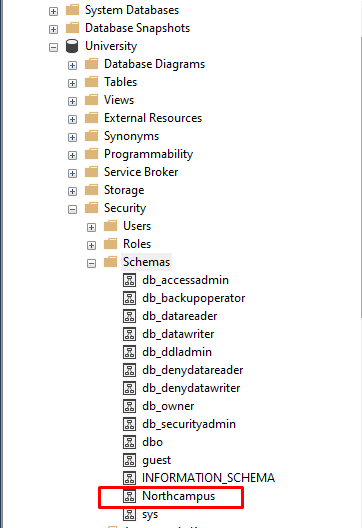
If you want to check all the schema name under the current database, you can use the below to find out the same.
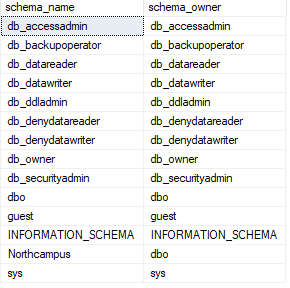
Once you have created the
NorthCampus schema, you can create object in it easily. For example, the following example create a
students tables in the
Northcampus schema.
CREATE TABLE Northcampus.students (
   roll_no integer PRIMARY KEY IDENTITY,
   first_name nvarchar(50) NOT NULL,
   last_name nvarchar(50) NOT NULL,
   department nvarchar(50) NOT NULL
);
In this tutorial, you have learnt how to create a new schema using SQL Server
CREATE SCHEMA statement.